Using birdears
What is Functional Ear Training
write me!
The method
We can use abc language to notate music within the documentation, ok
X: 1
T: Banish Misfortune
R: jig
M: 6/8
L: 1/8
K: Dmix
fed cAG| A2d cAG| F2D DED| FEF GFG|
AGA cAG| AGA cde|fed cAG| Ad^c d3:|
f2d d^cd| f2g agf| e2c cBc|e2f gfe|
f2g agf| e2f gfe|fed cAG|Ad^c d3:|
f2g e2f| d2e c2d|ABA GAG| F2F GED|
c3 cAG| AGA cde| fed cAG| Ad^c d3:|
birdears modes and basic usage
birdears actually has four modes:
melodic interval question
harmonic interval question
melodic dictation question
instrumental dictation question
To see the commands avaliable just invoke the command without any arguments:
birdears
Usage: birdears  <command> [options]

  birdears ─ Functional Ear Training for Musicians!

Options:
  --debug / --no-debug  Turns on debugging; instead you can set DEBUG=1.
  -h, --help            Show this message and exit.

Commands:
  dictation     Melodic dictation
  harmonic      Harmonic interval recognition
  instrumental  Instrumental melodic time-based dictation
  load          Loads exercise from .toml config file...
  melodic       Melodic interval recognition

  You can use 'birdears <command> --help' to show options for a specific
  command.

  More info at https://github.com/iacchus/birdears
birdears <command> --help
melodic
In this exercise birdears will play two notes, the tonic and the interval melodically, ie., one after the other and you should reply which is the correct distance between the two.
birdears melodic --help
Usage: birdears melodic [options]

  Melodic interval recognition

Options:
  -m, --mode <mode>               Mode of the question.
  -t, --tonic <tonic>             Tonic of the question.
  -o, --octave <octave>           Octave of the question.
  -d, --descending                Whether the question interval is descending.
  -c, --chromatic                 If chosen, question has chromatic notes.
  -n, --n_octaves <n max>         Maximum number of octaves.
  -v, --valid_intervals <1,2,..>  A comma-separated list without spaces
                                  of valid scale degrees to be chosen for the
                                  question.
  -q, --user_durations <1,0.5,n..>
                                  A comma-separated list without
                                  spaces with PRECISLY 9 floating values. Or
                                  'n' for default              duration.
  -p, --prequestion_method <prequestion_method>
                                  The name of a pre-question method.
  -r, --resolution_method <resolution_method>
                                  The name of a resolution method.
  -h, --help                      Show this message and exit.

  In this exercise birdears will play two notes, the tonic and the interval
  melodically, ie., one after the other and you should reply which is the
  correct distance between the two.

  Valid values are as follows:

  -m <mode> is one of: major, dorian, phrygian, lydian, mixolydian, minor,
  locrian

  -t <tonic> is one of: A, A#, Ab, B, Bb, C, C#, D, D#, Db, E, Eb, F, F#, G,
  G#, Gb

  -p <prequestion_method> is one of: none, tonic_only, progression_i_iv_v_i

  -r <resolution_method> is one of: nearest_tonic, repeat_only
harmonic
In this exercise birdears will play two notes, the tonic and the interval harmonically, ie., both on the same time and you should reply which is the correct distance between the two.
birdears harmonic --help
Usage: birdears harmonic [options]

  Harmonic interval recognition

Options:
  -m, --mode <mode>               Mode of the question.
  -t, --tonic <note>              Tonic of the question.
  -o, --octave <octave>           Octave of the question.
  -d, --descending                Whether the question interval is descending.
  -c, --chromatic                 If chosen, question has chromatic notes.
  -n, --n_octaves <n max>         Maximum number of octaves.
  -v, --valid_intervals <1,2,..>  A comma-separated list without spaces
                                  of valid scale degrees to be chosen for the
                                  question.
  -q, --user_durations <1,0.5,n..>
                                  A comma-separated list without
                                  spaces with PRECISLY 9 floating values. Or
                                  'n' for default              duration.
  -p, --prequestion_method <prequestion_method>
                                  The name of a pre-question method.
  -r, --resolution_method <resolution_method>
                                  The name of a resolution method.
  -h, --help                      Show this message and exit.

  In this exercise birdears will play two notes, the tonic and the interval
  harmonically, ie., both on the same time and you should reply which is the
  correct distance between the two.

  Valid values are as follows:

  -m <mode> is one of: major, dorian, phrygian, lydian, mixolydian, minor,
  locrian

  -t <tonic> is one of: A, A#, Ab, B, Bb, C, C#, D, D#, Db, E, Eb, F, F#, G,
  G#, Gb

  -p <prequestion_method> is one of: none, tonic_only, progression_i_iv_v_i

  -r <resolution_method> is one of: nearest_tonic, repeat_only
dictation
In this exercise birdears will choose some random intervals and create a melodic dictation with them. You should reply the correct intervals of the melodic dictation.
birdears dictation --help
Usage: birdears dictation [options]

  Melodic dictation

Options:
  -m, --mode <mode>               Mode of the question.
  -i, --max_intervals <n max>     Max random intervals for the dictation.
  -x, --n_notes <n notes>         Number of notes for the dictation.
  -t, --tonic <note>              Tonic of the question.
  -o, --octave <octave>           Octave of the question.
  -d, --descending                Wether the question interval is descending.
  -c, --chromatic                 If chosen, question has chromatic notes.
  -n, --n_octaves <n max>         Maximum number of octaves.
  -v, --valid_intervals <1,2,..>  A comma-separated list without spaces
                                  of valid scale degrees to be chosen for the
                                  question.
  -q, --user_durations <1,0.5,n..>
                                  A comma-separated list without
                                  spaces with PRECISLY 9 floating values. Or
                                  'n' for default              duration.
  -p, --prequestion_method <prequestion_method>
                                  The name of a pre-question method.
  -r, --resolution_method <resolution_method>
                                  The name of a resolution method.
  -h, --help                      Show this message and exit.

  In this exercise birdears will choose some random intervals and create a
  melodic dictation with them. You should reply the correct intervals of the
  melodic dictation.

  Valid values are as follows:

  -m <mode> is one of: major, dorian, phrygian, lydian, mixolydian, minor,
  locrian

  -t <tonic> is one of: A, A#, Ab, B, Bb, C, C#, D, D#, Db, E, Eb, F, F#, G,
  G#, Gb

  -p <prequestion_method> is one of: none, tonic_only, progression_i_iv_v_i

  -r <resolution_method> is one of: nearest_tonic, repeat_only
instrumental
In this exercise birdears will choose some random intervals and create a melodic dictation with them. You should play the correct melody in you musical instrument.
birdears instrumental --help
Usage: birdears instrumental [options]

  Instrumental melodic time-based dictation

Options:
  -m, --mode <mode>               Mode of the question.
  -w, --wait_time <seconds>       Time in seconds for next question/repeat.
  -u, --n_repeats <times>         Times to repeat question.
  -i, --max_intervals <n max>     Max random intervals for the dictation.
  -x, --n_notes <n notes>         Number of notes for the dictation.
  -t, --tonic <note>              Tonic of the question.
  -o, --octave <octave>           Octave of the question.
  -d, --descending                Wether the question interval is descending.
  -c, --chromatic                 If chosen, question has chromatic notes.
  -n, --n_octaves <n max>         Maximum number of octaves.
  -v, --valid_intervals <1,2,..>  A comma-separated list without spaces
                                  of valid scale degrees to be chosen for the
                                  question.
  -q, --user_durations <1,0.5,n..>
                                  A comma-separated list without
                                  spaces with PRECISLY 9 floating values. Or
                                  'n' for default              duration.
  -p, --prequestion_method <prequestion_method>
                                  The name of a pre-question method.
  -r, --resolution_method <resolution_method>
                                  The name of a resolution method.
  -h, --help                      Show this message and exit.

  In this exercise birdears will choose some random intervals and create a
  melodic dictation with them. You should play the correct melody in you
  musical instrument.

  Valid values are as follows:

  -m <mode> is one of: major, dorian, phrygian, lydian, mixolydian, minor,
  locrian

  -t <tonic> is one of: A, A#, Ab, B, Bb, C, C#, D, D#, Db, E, Eb, F, F#, G,
  G#, Gb

  -p <prequestion_method> is one of: none, tonic_only, progression_i_iv_v_i

  -r <resolution_method> is one of: nearest_tonic, repeat_only
Loading from config/preset files
Pre-made presets
birdears cointains some pre-made presets in it’s presets/
subdirectory.
The study for beginners is recommended by following the numeric order of those files (000, 001, then 002 etc.)
Pre-made presets description
write me
Creating new preset files
You can open the files cointained in birdears premade presets/
folder to have an ideia on how config files are made; it is simply the
command line options written in a form toml standard.
Keybindings
On the keybindings
The following keyboard diagrams should give you an idea on how the
keybindings work. Please note how the keys on the line from z
(unison) to , (comma, octave) represent the notes that are
natural to the mode, and the line above represent the chromatics.
Also, for exercises with two octaves, the uppercased keys represent
the second octave. For example, z is unison, , is the
octave, Z (uppercased) is the double octave. The same for all the other
intervals.
Major (Ionian)
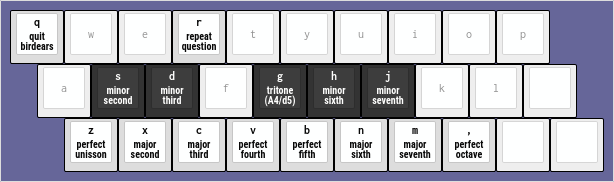
Keyboard diagram for the --mode major (default).
Dorian
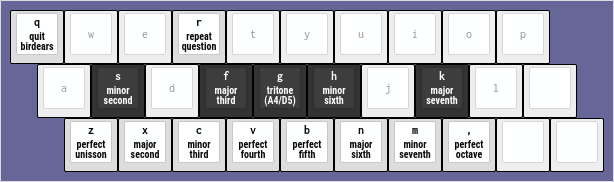
Keyboard diagram for the --mode dorian.
Phrygian
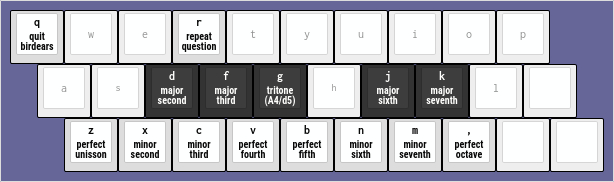
Keyboard diagram for the --mode phrygian.
Lydian
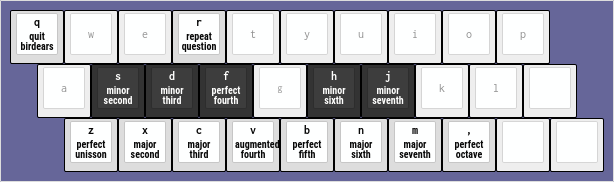
Keyboard diagram for the --mode lydian.
Mixolydian
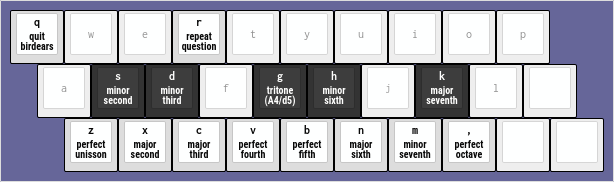
Keyboard diagram for the --mode mixolydian.
Minor (Aeolian)
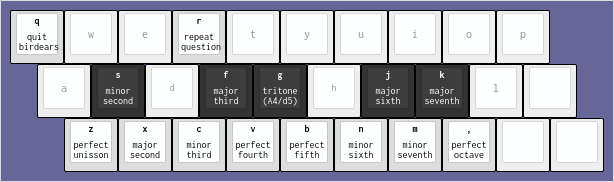
Keyboard diagram for the --mode minor.
Locrian
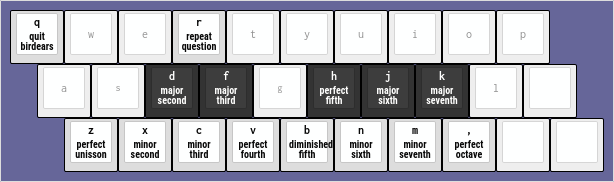
Keyboard diagram for the --mode locrian.